Threads Video Downloader — Save as MP4
Save any video from a public Threads post as an HD MP4 — no watermark. Paste the link, preview the clip right on the page, and download; multi-video posts come as one ZIP.
Processing passes through our server, but no files, links, or logs are ever stored — media streams straight from Threads to your device.
Just want someone's profile picture? Try the Threads DP downloader →
Why ThreadSave?
Original MP4, no re-encoding
You get the exact video file Threads serves — same resolution, original audio, nothing re-compressed. When a clip offers more than one quality, you choose which to save.
Preview before you save
Each video plays inline in a normal player, so you can confirm it's the right clip and check the quality before downloading anything.
Any device, no app
Runs in Safari, Chrome, or any browser on iPhone, Android, and desktop — nothing to install and no account to create.
How to download
- 1
Open the Threads app or threads.com and find the post with the video you want.
- 2
Tap the share icon under the post and choose "Copy link".
- 3
Come back here, paste the link into the box above, and hit Download.
- 4
Pick the quality you want and the MP4 saves straight to your device.
How to copy a Threads link
On mobile (app)
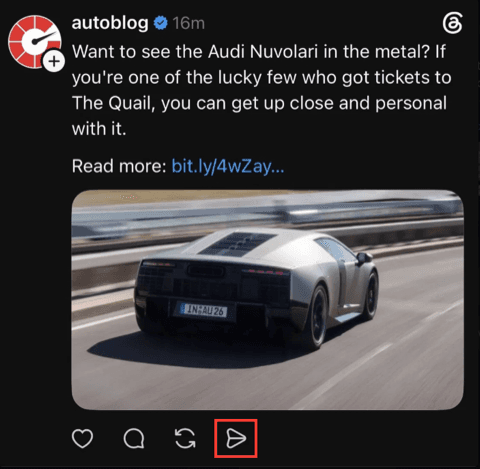
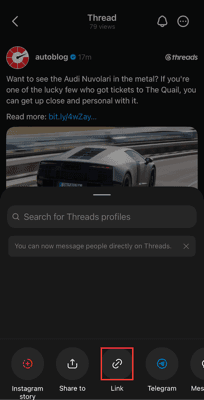
On desktop (web)
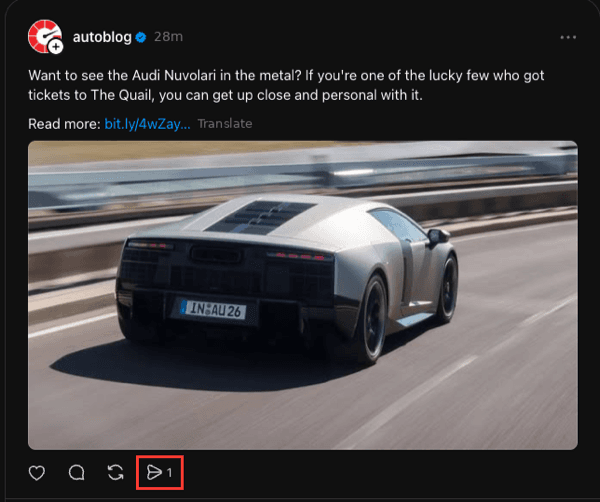
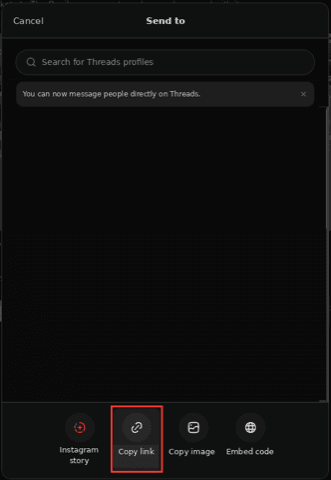
What is Threads — and why you need a downloader
Threads is Meta's text-and-media social app, tied to your Instagram account. People post short videos, photos, and threads of updates — but the app has no button to save someone else's video to your device. A Threads video downloader fills that gap: paste the public post link and it hands you the original MP4, so you can keep a clip for offline viewing without screen-recording or losing quality.
Looking for images instead? Use the Threads photo downloader, pull every slide from a multi-photo post with the carousel downloader, or save a profile picture in full size.
What quality are Threads videos, and can I choose the resolution?
Threads serves videos as standard MP4 files, and larger clips often come in more than one resolution. When multiple qualities exist, each appears with its own button, so you can take full HD for archiving or a lighter file for quick sharing. The audio track is embedded and left untouched — nothing is re-encoded on our side.
Need a still frame rather than the clip? Grab the photo instead, or pull every item from a mixed post with the carousel tool.
Where does a Threads video save on iPhone, Android, and PC?
On iPhone, Safari drops the MP4 into the Files app under Downloads; open it there and tap Share → Save Video to move it into Photos. On Android, Chrome saves straight to your Downloads folder and it usually appears in Gallery. On a PC or Mac the file lands in your browser's default download folder, or you can right-click the preview and choose "Save video as…" to pick a location.
Why won't my Threads video download?
Threads media links are signed and expire after roughly 24 hours, so an old page can point at a dead file. If Download does nothing, reload this page, re-copy the post link from Threads, and try again with the fresh link. Opening the site in a normal (non-incognito) window and pausing ad-block or privacy extensions also helps, since they sometimes block the file stream.
Kept simple and private
No account, no app, and nothing about your clip is stored. We fetch the MP4, stream it to you, and forget the request — no history, no copies.
Frequently asked questions
How do I download a video from Threads?+
Copy the post link from the Threads app (share icon → Copy link), paste it into the box at the top of this page, and press Download. You'll see a preview with one or more quality options — tap the one you want and the MP4 downloads to your device. Some people call it a thread video downloader, or just search for thread download — it's the same tool, and it stays free.
Can I download Threads videos as MP4?+
Yes — MP4 is exactly what you get. Threads serves its videos as MP4 files, and ThreadSave hands that original file to you untouched, so there's no conversion step and no quality loss. Whether you search for threads to mp4 or thread to mp4, it's the same one-step job: paste the post link, and the file you save is already an MP4 that plays anywhere.
Can I choose the video quality?+
When Threads offers more than one resolution, each option appears with its own Download button so you can pick the size you want. Otherwise you get the single original file Threads provides.
Does downloading reduce the video quality?+
No. We hand you the exact MP4 Threads serves, so the video is as sharp as the original upload — much better than a screen recording.
Does ThreadSave add a watermark to downloaded videos?+
No. ThreadSave adds no watermark or logo of its own — you get the original MP4 exactly as Threads serves it, so it downloads without watermark from us. If a clip already has a watermark the creator burned into it, that's part of the original file and we neither add to it nor remove it.
Can I download from a private Threads account?+
No. This only works with public posts and profiles — the same content anyone can see in a browser without logging in. Private accounts are protected by Threads and we don't bypass that.
Is there a watermark on the files?+
No. You get the original file exactly as Threads serves it — no logo and no quality loss from us.