How to download Threads videos on PC
Save any public Threads video on your Windows PC or Mac — any browser, no software. Paste the link below, download, and the MP4 lands in your Downloads folder.
Processing passes through our server, but no files, links, or logs are ever stored — media streams straight from Threads to your device.
Why ThreadSave?
How to download
- 1
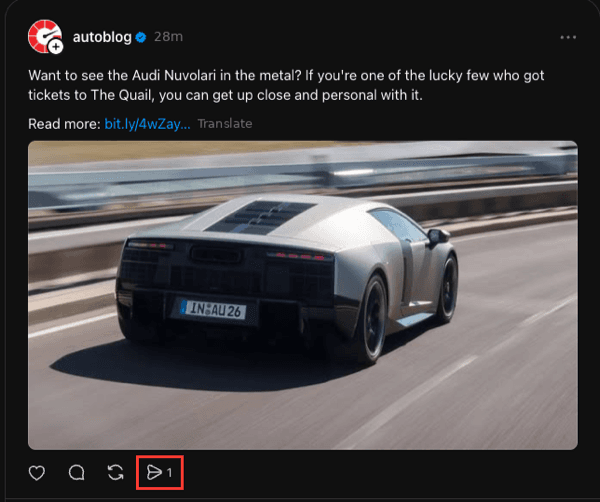
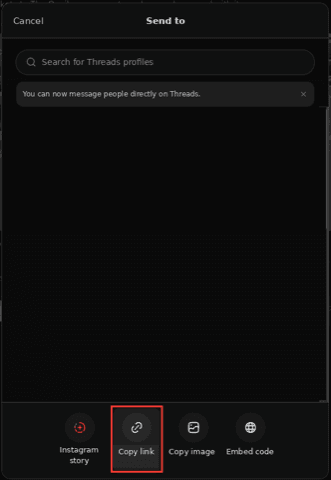
On threads.com, click the share icon under the post and choose "Copy link" (or copy the URL from the address bar).
- 2
Come back to this page and paste the link into the box above.
- 3
Click Download and pick the quality you want.
- 4
The MP4 saves to your Downloads folder — or right-click the preview and choose "Save video as…" to pick a location.
How to copy a Threads link
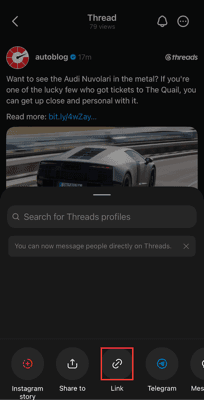
On mobile (app)

On desktop (web)
What is Threads — and why you need a downloader
On a computer there's no Threads app, and the website gives no download option — so saving a video means copying the link and using a web tool. This guide covers the desktop steps for Windows and Mac in any browser: paste the link here, click Download, and the MP4 goes to your Downloads folder, or use right-click "Save video as…" to choose where it lands.
On mobile instead? See how to download Threads videos on iPhone or Android.
Private by design
We never ask you to log in, and no files are stored on our servers. Your link is processed in memory and the media streams straight from Threads' CDN to your device. Nothing is saved, tracked, or shared.
Frequently asked questions
How do I download a Threads video on my computer?+
Copy the post link from threads.com, paste it into the box above, and click Download. The MP4 saves to your browser's Downloads folder — no software required.
Does this work on both Windows and Mac?+
Yes. It runs in any modern browser — Chrome, Edge, Firefox, or Safari — on both Windows and macOS, with nothing to install.
Can I choose where the file saves?+
Yes. Either set your browser to ask where to save downloads, or right-click the video preview and choose "Save video as…" to pick a folder.
Do I need to log in or give a password?+
No. You never log in and we never ask for a password or any account access. You only paste a public link — that's the entire interaction.
Do I need to install any software or an app?+
No. This is a web tool that runs entirely in your browser. There's nothing to download or install, and it works the same on a phone, tablet, or computer.
Is it really free?+
Yes, completely free with no limit on how many downloads you can make. There's no account, no subscription, and no watermark added to your files.
Is it safe, and do you collect my data?+
Processing passes through our server so we can reach Threads, but we don't store your links, the media, or any logs, and we never ask you to sign in. Nothing about what you download is saved, tracked, or shared.
Can I download from a private Threads account?+
No. This only works with public posts and profiles — the same content anyone can see in a browser without logging in. Private accounts are protected by Threads and we don't bypass that.
Is there a watermark on the files?+
No. You get the original file exactly as Threads serves it — no logo and no quality loss from us.