Threads Audio Downloader
Want just the sound from a Threads video? Paste the post link and download the video file — its original audio is intact, ready to keep or extract.
Processing passes through our server, but no files, links, or logs are ever stored — media streams straight from Threads to your device.
Why ThreadSave?
Original audio, untouched
Threads keeps sound inside the video's MP4. You get that original file with its audio intact — nothing transcoded on our side, so the quality stays original.
Convert to MP3 anywhere
Once the MP4 is saved, any free converter on your phone or computer extracts just the sound to MP3 in seconds.
No servers, no wait
Because we don't transcode, there's no processing queue — the file downloads straight away.
How to download
- 1
Open the Threads post with the video whose audio you want.
- 2
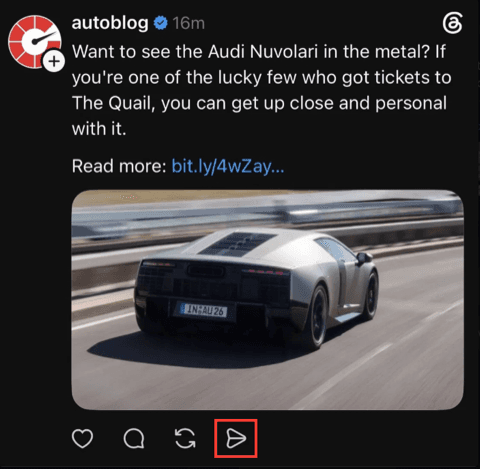
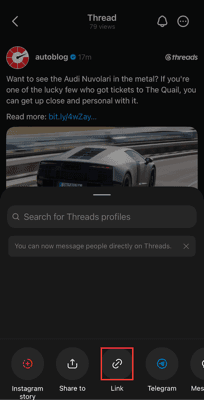
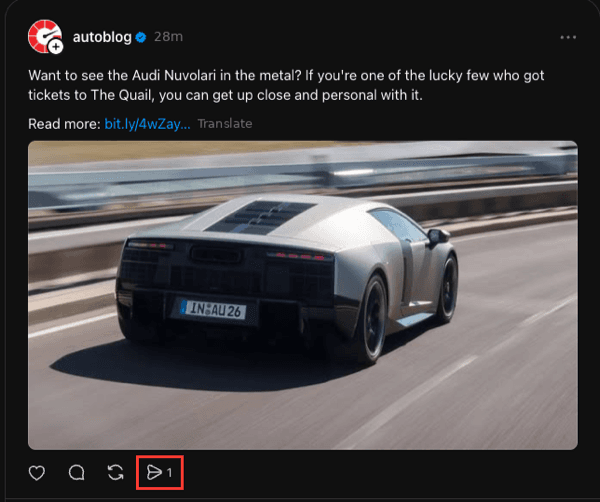
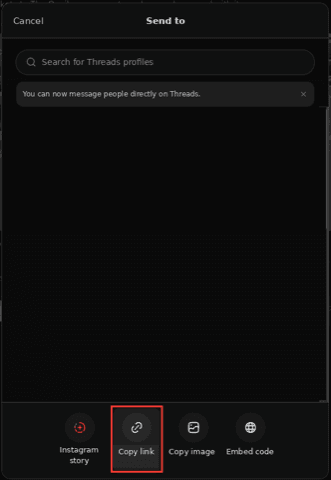
Tap the share icon and choose "Copy link".
- 3
Paste the link into the box above and hit Download.
- 4
Save the video file — it carries the original, unmodified audio track you can play or extract.
How to copy a Threads link
On mobile (app)
On desktop (web)
What is Threads — and why you need a downloader
Sometimes you only want the sound from a Threads video — a voice clip, a song, a snippet. Threads has no audio export, and it stores video and audio together in one file. A Threads audio downloader gives you that original video file with its untouched audio track, which any free converter can turn into an MP3. We deliberately don't transcode on our side, so the sound stays at original quality and downloads stay fast.
Prefer the whole video? Use the Threads video downloader. For animations, see the Threads GIF downloader.
How does Threads store audio, and what file do I get?
Threads keeps no separate audio file — the sound lives inside the video's MP4. This tool gives you that original MP4 with its audio track intact and untouched, at the quality it was uploaded. Nothing is transcoded on our servers, so the sound stays original and the download stays fast.
Want to keep the picture too? Just use the video downloader for the full clip, or the GIF tool for silent animations.
How do I turn a Threads video into an MP3 on my device?
Once the MP4 is on your device, any free video-to-MP3 converter extracts just the sound in seconds — there are web and app converters for iPhone, Android, and desktop alike. The MP4 itself saves to Files → Downloads on iPhone, the Downloads folder on Android, or your browser's folder on a computer.
Why isn't there any audio to download?
A text-only post has no audio to pull, and a link copied more than a day ago may have expired — re-copy the post link from Threads and try again. Opening the site in a normal window with privacy extensions paused also helps the file stream through.
Straight through, nothing stored
The file streams from Threads to you untouched. We don't transcode it, and we don't keep the media or the link afterward.
Frequently asked questions
How do I get the audio from a Threads video?+
Paste the post link above and press Download to save the video file, which contains the original audio. Then use any free video-to-MP3 converter on your device to pull out just the sound.
Does this give me an MP3 directly?+
Not yet — you download the original video file with its audio intact, then convert it to MP3 with any free tool. We avoid converting on our servers so the sound stays original quality and downloads stay fast.
Will the audio quality be reduced?+
No. Because we hand you the untouched original file, the audio is exactly as it was uploaded. Any quality change would only come from your own converter's settings.
Do I need to log in or give a password?+
No. You never log in and we never ask for a password or any account access. You only paste a public link — that's the entire interaction.
Do I need to install any software or an app?+
No. This is a web tool that runs entirely in your browser. There's nothing to download or install, and it works the same on a phone, tablet, or computer.
Is it really free?+
Yes, completely free with no limit on how many downloads you can make. There's no account, no subscription, and no watermark added to your files.
Is it safe, and do you collect my data?+
Processing passes through our server so we can reach Threads, but we don't store your links, the media, or any logs, and we never ask you to sign in. Nothing about what you download is saved, tracked, or shared.
Can I download from a private Threads account?+
No. This only works with public posts and profiles — the same content anyone can see in a browser without logging in. Private accounts are protected by Threads and we don't bypass that.
Is there a watermark on the files?+
No. You get the original file exactly as Threads serves it — no logo and no quality loss from us.